RAG
What is RAG?
Retrieval Augmented Generation (RAG) is an AI framework that retrieves facts from an external knowledge base to ground large language models (LLMs) on the most accurate, up-to-date information and to give users insight into LLMs’ generative process [Wikipedia].
Retrieval-augmented generation - Wikipedia https://en.wikipedia.org/wiki/Retrieval-augmented_generation
In simpler terms: instead of asking the LLM to answer from its (frozen, possibly outdated) training data alone, you first look up relevant documents in your own vector store and hand them to the LLM as context. The LLM’s answer is grounded in those documents, and the source can be cited – reducing hallucinations and making the process transparent.
Why RAG over fine-tuning?
RAG has several advantages over fine-tuning (retraining) a model on your data:
No training cost – no GPU needed, no training pipeline. RAG works with any LLM out of the box.
Incremental – add documents any time; no re-training needed.
Grounded answers – the LLM cites its sources. Fine-tuned models can still hallucinate facts they were trained on.
Transparent – you control the corpus. If an answer looks wrong, you can inspect the retrieved chunks.
Swap models freely – change the underlying LLM without rebuilding your knowledge base.
Fine-tuning still has its place (teaching a model an entirely new skill or output format), but for open-ended question answering over a document collection, RAG is the simpler and more maintainable choice.
Klea’s architecture
At a high level, a query flows through these stages:
Guard (optional) – a safety model (e.g.
llama-guard3) checks whether the query is safe and appropriate. Unsafe queries are declined immediately. SetKLEA_RAG_GUARD_MODELto an empty value to skip this step entirely.Classify – a chat model classifies the query into one of the configured domains (e.g. “NeuroML documentation”), or routes it to general chat, or refuses if no domain matches.
Retrieval – the system generates one or more search queries, optionally calls MCP tools (for live data), and retrieves the most relevant chunks from the matching domain’s stores (vector stores and/or BM25 keyword stores). Results from the different stores are combined with Reciprocal Rank Fusion (see Hybrid retrieval (vector + BM25)).
Answer – the chat model generates an answer from the retrieved context, citing its sources.
Evaluate – an evaluator checks the answer’s quality. If it is unsatisfactory, the system can loop back to retrieve more information, rewrite the query, or regenerate the answer.
Memory – conversation history is summarised per session so the system can refer to earlier exchanges.
The pipeline is implemented as a LangGraph state machine, using
the shared BaseLangGraph
orchestrator from klea_utils.
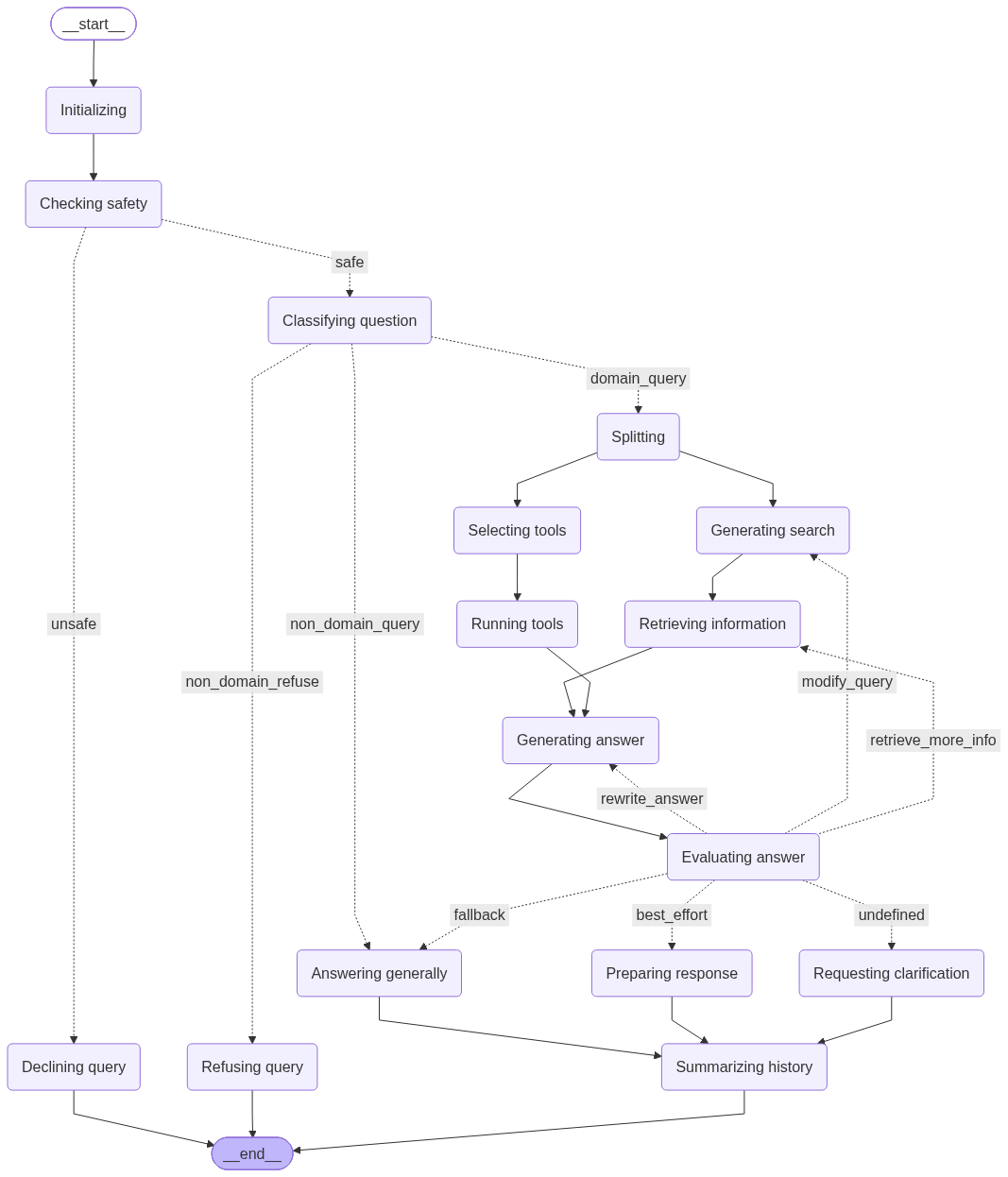
The RAG pipeline visualised as a LangGraph state machine.
Domains and stores
Domains are the organising unit of Klea RAG:
A domain bundles related knowledge and configuration (e.g. “NeuroML documentation”, “My project’s internal docs”).
Each domain has one or more stores containing the chunks: vector stores (dense embedding similarity) and/or BM25 keyword stores (classic lexical search).
The classifier uses the domain’s description to decide where a query should go.
Domains can also have MCP servers attached, giving the LLM access to live tools (e.g. a validation server, a database query tool).
Each store’s name in the config must exactly match the
--collection name used when the store was created with
klea-stores-create, and its path must match the location the
chunks were written to. Retrieval looks stores up by name, so a
mismatch silently returns no results. For local Chroma stores the
path points at the store folder; the database file inside it is
always named chroma.sqlite3 (see
Create and use a RAG system). Chroma collections created by
klea-stores-create use cosine HNSW distance, so the vector-store
relevance score is a cosine similarity (and the retrieval
score_threshold reads as a minimum cosine similarity).
This means one RAG server can simultaneously serve completely different knowledge areas – the classifier routes queries to the right domain automatically.
Hybrid retrieval (vector + BM25)
Each domain can configure vector_stores, bm25_stores, both, or
neither. BM25 provides a classic keyword search that complements
dense embedding similarity: exact names, symbols, and terminology that
a semantic search might miss are surfaced by the lexical match.
When a domain configures both, every query runs against all of the
domain’s stores and the results are combined with Reciprocal Rank
Fusion (RRF): a document is scored by its rank within each store’s
result list (1 / (60 + rank)), so results from the different stores
are merged without comparing their raw scores (cosine similarity and
BM25 scores are not on the same scale). Duplicate chunks are removed
and the top k references are kept.
The original per-source scores are preserved in each document’s
_source_scores metadata, so the answer LLM sees e.g. both the
vector-store similarity and the BM25 score, labelled by source.
These per-source scores are informational context, not a comparable
ranking. The vector-store score is a cosine similarity in [0, 1]
(1 = most similar to the query), while the BM25 score is a raw keyword
relevance value on an unbounded scale (higher = more matching terms).
The two are on different scales, so a BM25 value of e.g. 5.1 does
not mean the chunk is “better” than one with a vector-store score of
0.68. Documents are ordered by the RRF rank fusion above, never by
comparing these raw values.
To create a BM25 store alongside a vector store, pass
--bm25-store to klea-stores-create (see
Create and use a RAG system), then add a bm25_stores
entry to the domain config pointing at the written corpus file.
Bibliographic metadata extraction
When documents are chunked, Klea automatically tries to populate the
per-file DEFAULT entry of metadata-map.template.json with
bibliographic metadata (title, authors, keywords, DOI, URL). This is a
pre-population aid: the researcher reviews and corrects the values
before storing, rather than filling the metadata map in from scratch.
Multiple URLs are written as separate keys (url_1, url_2, …);
each url* key is shown as its own reference in retrieval results and
passed to the answer LLM. A non-numeric key suffix becomes its display
label: rename url_1 to url_orcid in the template and the
reference panel shows orcid: <url>. When a DOI is found, the
DEFAULT entry also gets a url_doi key derived from it
(https://doi.org/<doi>).
The extraction runs a tiered cascade, most authoritative first; each tier only fills fields the tiers above it have not already set:
doi-service– a DOI discovered anywhere in the document is resolved via Crossref, OpenAlex and Semantic Scholar. The three APIs are queried in round-robin order to spread load, falling back to the others when one is rate-limited, and results are cached to disk so re-ingests never re-query. The resolved record’s title, authors, year, venue and DOI override everything below.pdf-info– the PDF Info dict (title, authors, keywords), read with pypdfium2. Often empty: many publishers ship no bibliographic fields in the PDF.docling– the free structured signals from Docling’s layout model: the title item, the origin mimetype/URI, and the hyperlinks on text items.layout-regex– regex over the focused first-page header region (the top fraction of page one, selected via the layout bounding boxes).regex– regex over the first ~3000 characters of the document.
Two internal keys are added to each file’s DEFAULT entry:
_metadata_complete–Trueonly when a full DOI record (title + authors + year) or a full PDF Info dict (title + author + keywords) was obtained;Falsemeans the researcher should review the entry._sources– the tiers that contributed at least one field, in precedence order (e.g.["doi-service", "regex"]).
These keys are internal: they guide the researcher reviewing the template, and are never shown to the answer LLM.
DOI resolution uses the APIs’ polite pool when KLEA_INGEST_MAILTO
is set to an email address (higher rate limits). It is skipped
entirely when no DOI is found in the document. Optical character
recognition (OCR), which slows the conversion of text-based PDFs
considerably, can be disabled with klea-stores-create --no-ocr (see
Wikipedia
for details).
Docling selects the inference accelerator automatically (CUDA, MPS, or
CPU), but GPUs with a CUDA capability below 7.0 (e.g. a Quadro P1000)
cannot run the Triton-compiled layout model. Set the DOCLING_DEVICE
environment variable to cpu in that case (optionally raising
DOCLING_NUM_THREADS above the default of 4 to use more CPU cores);
see Create and use a RAG system for a worked example.
See Bibliographic metadata extraction (klea\_utils.biblio) for the Python API and
Create and use a RAG system for the chunk / store
workflow.
See also
Glossary – definitions of key terms
Create and use a RAG system – walk through setting up a RAG system end to end
klea-rag-serve – server CLI reference
klea-rag – client CLI reference (CLI, NiceGUI, Streamlit)